Video game backlog tracker
Make your backlog useful again
Keep every game you are playing, pausing, finishing or saving for later in one cross-platform list. GamingList replaces scattered libraries and forgotten spreadsheets with a backlog you can actually maintain.
01
Statuses that match how people really play
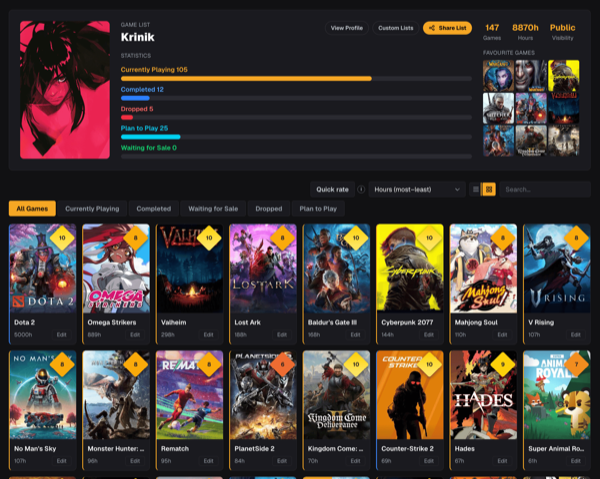
Separate Currently Playing, Paused and Replaying instead of forcing every started game into one bucket. Completed, Dropped, Plan to Play and Waiting for Sale keep the rest of your backlog honest.
02
One collection across every platform
Track PC, Steam, Xbox, PlayStation, Nintendo and older consoles together. Record the platform and hours on each entry without making separate lists for every storefront.
03
Fast enough for a large library
Import Steam, Xbox or PlayStation games, use Quick rate to update scores and statuses with one click, then filter and sort the collection when you need to decide what comes next.
04
A permanent record, not another storefront
Your list remains useful when you switch consoles. Ratings, reviews, hours played, completion history and personal notes stay connected to your profile.
05
Hours played on every entry
Log hours played per game by hand, or let a Steam import bring existing playtime in with it. Sort a backlog by time invested to see where a year of gaming actually went.
06
Export your backlog as CSV whenever you want
Download the whole video-game list as a CSV: titles, statuses, scores, hours played, platform, completion dates, ownership and private notes. Your tracking history stays yours, ready for a spreadsheet or a backup.
How it works
Step 1
Import or add games
Bring in a Steam, Xbox or PlayStation library, or search the catalog and add titles manually.
Step 2
Set the real status
Mark each game as playing, paused, completed, dropped or something you plan to play.
Step 3
Rate and share
Add scores and reviews, then keep the list private or share it through your gaming profile.
Questions players ask
The practical details before you move your backlog into one place.
Can I import an existing game library?+
Steam, Xbox and PlayStation imports are supported. Imported games appear in your main list and can then be organized, rated and reviewed like manually added games.
Can I keep my backlog private?+
Yes. Profiles can be public, unlisted or private. Unlisted pages work through a direct link, while private profiles remain visible only to their owner.
Does GamingList track completion dates?+
Yes. New completions receive an exact completion date. Older completed entries can be represented as estimated history when that is the only date available.
Can I create smaller themed lists too?+
Yes. Your main backlog is separate from custom ranked lists such as favorite RPGs, co-op games or anything else you want to curate.
Can I export my game list?+
Yes. You can export your video-game list as a CSV file from profile settings. The export includes each game title, status, score, hours played, platform, completion date, ownership and your private notes, so you can keep a backup or analyse your backlog in a spreadsheet.
Does GamingList track hours played?+
Yes. Every list entry can record hours played. You can enter the time yourself, and a Steam import brings existing playtime across automatically, so a large library can be sorted by how much time you actually invested.
Your backlog deserves one reliable home
Start with a few games or import a whole library. You can refine the details over time.