Shareable gaming profile
A gaming profile built from what you actually play
Turn your list into a personal gaming identity. Show current games, favorites, detailed ratings, reviews, achievements, custom lists and statistics through one profile you control.
01
Show your taste before your totals
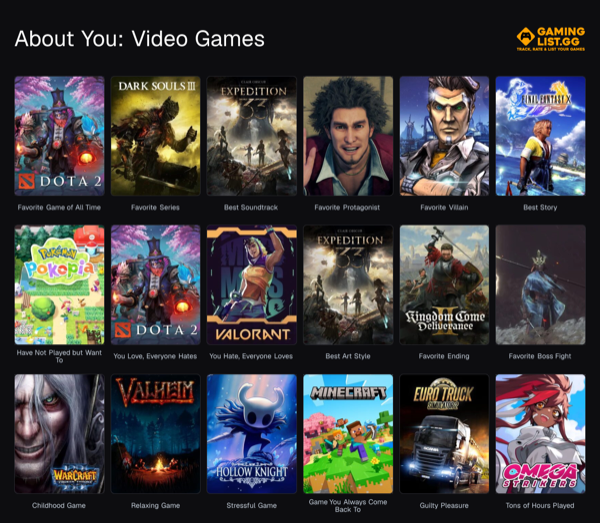
Choose favorite games, genres, publishers and characters. Build a 3×3 or About You card that says more than a library count ever could.
02
Keep current games visible
The Currently Playing shelf updates from the statuses in your main list, so the profile reflects what you are actually spending time with now.
03
Bring reviews, stats and achievements together
Visitors can move from your profile to your game reviews, personal statistics, achievements and complete list without losing the context of who they are looking at.
04
Control who gets to see it
Use a public profile for discovery, an unlisted profile for direct sharing, or a private profile when the list is only for you.
How it works
Step 1
Build the main list
Add or import games so the profile has a real playing history behind it.
Step 2
Choose what represents you
Select favorites, social links, profile art, genres and custom profile cards.
Step 3
Share one link
Let friends browse your current games, reviews, stats, achievements and curated lists.
Questions players ask
The practical details before you move your backlog into one place.
Can I hide my gaming profile?+
Yes. Public, unlisted and private visibility settings apply to the profile and its main game list.
Does the profile update automatically?+
Sections such as Currently Playing, reviews and statistics are calculated from the latest state of your list. Favorites and custom cards remain under your control.
Can people follow my profile?+
Yes. Public users can follow one another, filter the community feed to followed profiles and receive notifications for new followers and reactions.
Can I compare profiles with a friend?+
Yes. GamingList can compare shared games, matching ratings, disagreements and recommendations between two public profiles.
Make your gaming history worth sharing
Your profile grows naturally as you update the list—there is no separate feed to maintain.